

Panchatantra 2.0 Attendance – Karnataka Login, Module, Report Online Check
Panchatantra 2.0 Attendance ,panchatantra.kar.nic.in 2.0 login | Panchatantra 2.0 Login Karnataka check online report, attendance | panchatantra.karnataka.gov.in 2.0

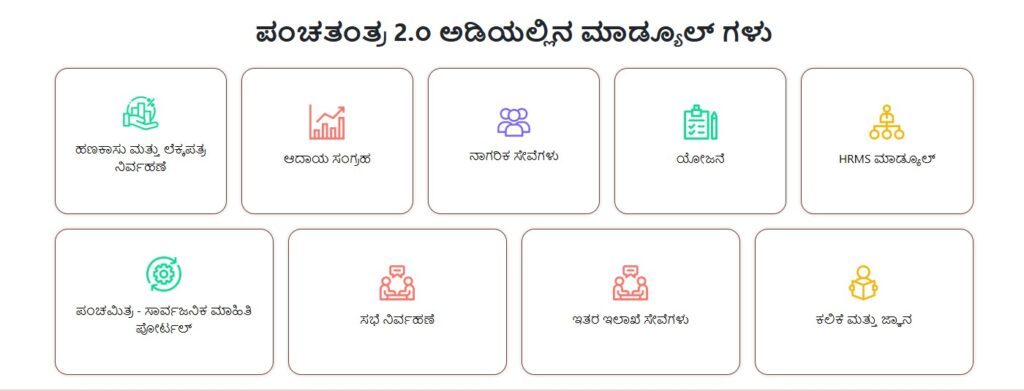
Friends, today we will give you information about Panchatantra portal. Here we will tell you how you can check Panchatantra 2.0 Login Karnataka – Module, Report, Attendance etc. For this you have to read the article carefully till the end. Panchatantra is a portal where you get various types of information like Finance & Accounting, Revenue Collection, Citizen Service, Planning, HRMS Module , Panchamitra , Meeting Managemen , Family & Beneficiary Learning Knowledge and Admin and User Management.

You can easily get all this information on this one Panchatantra 2.0 portal. Here we have also told in our article that how you can do “Panchatantra Login” through your mobile or laptop.

Panchatantra 2.0 portal

| Portal Name | Panchatantra 2.0 |
|---|---|
| State | Karnataka |
| Process | Online |
| Official Website | https://panchatantra.karnataka.gov.in/ |
How to Panchatantra 2.0 Login Online?
- To login Panchatantra 2.0, first you have to go to the official website.
- Now you have to click on the button of the home page “Login“.
- Now on the page which is open in front of you, you have to enter your user ID and password.
- If you do not have user id and password, then you can create user id and password by clicking on the option of “Register”.
How to check Panchatantra 2.0 finance and accounting module report?
Let us tell you that the module captures receipt and expenditure details through voucher entries and automatically generates cash book, register etc. through double entry accounting system.

- First of all, you have to visit the official website.
- After that click on the “finance and accounting” option.
- Now click on “Finance and Accounting Reports“
- After that select your Zila, Taluk, Grama Panchayat, Report Type & Financial Year and click on “Search” button.
- Now the page that will open in front of you, the complete details of “Panchatantra Module” will open in front of you.
How to check online HRMS Module Attendance?
- First of all, you have to visit the official website.
- After that click on the “HRMS Module” option.
- Now various options will open in front of you, click on whatever information you want to see in it.
- Here we will tell you about the information about “Month Wise Salary Report“.
- Now you can also check the information by clicking on the button of “search” by entering the asked information.
FAQs
How to Panchatantra 2.0 Login Online?
To login in Panchatantra 2.0 portal, first of all you have to visit the official website. After that click on “Login” button and enter your user name and password, then click on login button.
What is the official website of Panchatantra 2.0?
The official website of Panchatantra 2.0 is https://panchatantra.karnataka.gov.in/